Chaining in Langchain
Review
In this blogpost We built a simple graph with nodes, normal edges, and conditional edges. This is based on the sample published in langchain academy as well
Goals of this Exercise
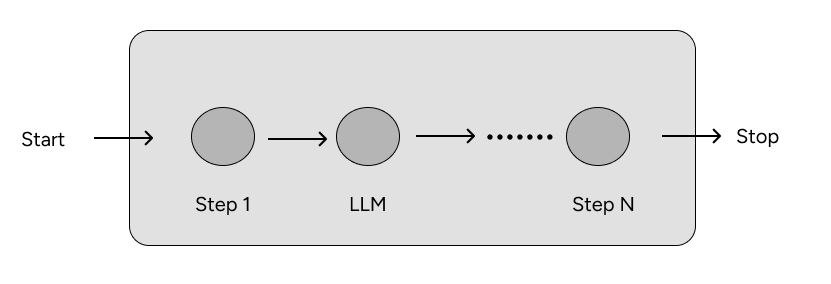
Simple chain that combines 4 concepts:
-
Using chat messages as our graph state. Based on the documentation: :anguage models take a list of messages as input and return a message. There are a few different types of messages. All messages have a role, content, and response_metadata property as we saw in the earlier posts.
The role describes WHO is saying the message. The standard roles are “user”, “assistant”, “system”, and “tool”. LangChain has different message classes for different roles.
- Using chat models in graph nodes: Chat models are language models that use a sequence of messages as inputs and return messages as outputs (as opposed to using plain text). These are generally newer models.
e.g chat models
from langchain.chat_models import init_chat_model model = init_chat_model("gemini-2.5-flash", model_provider="google_genai") -
Binding tools to our chat model. Tools are utilities which are designed to be called by a chat model we defined above. Rheir inputs are designed to be generated by chat models, and their outputs are designed to be passed back to the calling model. Tools are needed whenever a model wants to control parts of your code or call out to external APIs.
tools = [...] # Define a list of tools llm_with_tools = llm.bind_tools(tools) ai_msg = llm_with_tools.invoke("do xyz...") # -> AIMessage(tool_calls=[ToolCall(...), ...], ...) - Executing tool calls in graph nodes.
%%capture --no-stderr
%pip install --quiet -U langchain_openai langchain_core langgraph
Messages
Chat models can use messages, which capture different roles within a conversation.
LangChain supports various message types, including HumanMessage, AIMessage, SystemMessage, and ToolMessage.
These represent a message from the user, from chat model, for the chat model to instruct behavior, and from a tool call.
Let’s create a list of messages.
Each message can be supplied with a few things:
content- content of the messagename- optionally, a message authorresponse_metadata- optionally, a dict of metadata (e.g., often populated by model provider forAIMessages)
from pprint import pprint
from langchain_core.messages import AIMessage, HumanMessage

messages = [AIMessage(content=f"So you said you were researching ocean mammals?", name="Model")]
messages.append(HumanMessage(content=f"Yes, that's right.",name="Lance"))
messages.append(AIMessage(content=f"Great, what would you like to learn about.", name="Model"))
messages.append(HumanMessage(content=f"I want to learn about the best place to see Orcas in the US.", name="Lance"))

for m in messages:
    m.pretty_print()
===[1m Ai Message [0m============
Name: Model
So you said you were researching ocean mammals?
===[1m Human Message [0m=========
Name: Lance
Yes, that's right.
===[1m Ai Message [0m============
Name: Model
Great, what would you like to learn about.
===[1m Human Message [0m=========
Name: Lance
I want to learn about the best place to see Orcas in the US.
Chat Models
Chat models can use a sequence of message as input and support message types, as discussed above.
There are many to choose from! Let’s work with OpenAI.
Let’s check that your OPENAI_API_KEY is set and, if not, you will be asked to enter it.
import os, getpass

def _set_env(var: str):
    if not os.environ.get(var):
        os.environ[var] = getpass.getpass(f"{var}: ")

_set_env("OPENAI_API_KEY")
We can load a chat model and invoke it with out list of messages.
We can see that the result is an AIMessage with specific response_metadata.
from langchain_openai import ChatOpenAI
llm = ChatOpenAI(model="gpt-4o")
result = llm.invoke(messages)
type(result)
langchain_core.messages.ai.AIMessage
Let us print the AIMessage result we got from the LLM.
result
AIMessage(content='One of the best places to see orcas in the United States is the Pacific Northwest, particularly around the San Juan Islands in Washington State. This area is renowned for its resident orca pods, especially during the months of April through October when salmon runs are at their peak, providing an abundant food source for the orcas.\n\nA popular spot is Lime Kiln Point State Park on San Juan Island, often called "Whale Watch Park," where you can sometimes see orcas from the shore. Additionally, there are numerous boat tours available from Friday Harbor and other nearby locations that offer the chance to see these magnificent creatures up close.\n\nOther good areas for spotting orcas in the US include the Puget Sound near Seattle, and off the coast of California, especially near Monterey Bay, although sightings there are less predictable compared to the San Juan Islands.', additional_kwargs={'refusal': None}, response_metadata={'token_usage': {'completion_tokens': 169, 'prompt_tokens': 67, 'total_tokens': 236, 'completion_tokens_details': {'accepted_prediction_tokens': 0, 'audio_tokens': 0, 'reasoning_tokens': 0, 'rejected_prediction_tokens': 0}, 'prompt_tokens_details': {'audio_tokens': 0, 'cached_tokens': 0}}, 'model_name': 'gpt-4o-2024-08-06', 'system_fingerprint': 'fp_f33640a400', 'id': 'chatcmpl-CKpEZx2POJcSGb6hulEoq3aIg4vPV', 'service_tier': 'default', 'finish_reason': 'stop', 'logprobs': None}, id='run--3fb5310e-ebea-476d-9635-96430e18a225-0', usage_metadata={'input_tokens': 67, 'output_tokens': 169, 'total_tokens': 236, 'input_token_details': {'audio': 0, 'cache_read': 0}, 'output_token_details': {'audio': 0, 'reasoning': 0}})
We want to focus on response metadata
result.response_metadata
{'token_usage': {'completion_tokens': 169,
  'prompt_tokens': 67,
  'total_tokens': 236,
  'completion_tokens_details': {'accepted_prediction_tokens': 0,
   'audio_tokens': 0,
   'reasoning_tokens': 0,
   'rejected_prediction_tokens': 0}, ..}
Somethings to highlight, completion tokens are 169 tokens, prompt tokens were 67, hence total tokens 236.
Tools
Tools are useful whenever you want a model to interact with external systems.
External systems (e.g., APIs) often require a particular input schema or payload, rather than natural language.
When we bind an API, for example, as a tool we given the model awareness of the required input schema.The model will choose to call a tool based upon the natural language input from the user. It will return an output that adheres to the tool’s schema.
Many LLM providers support tool calling and tool calling interface in LangChain is simple.
You can simply pass any Python function into ChatModel.bind_tools(function).
which allows normal Python functions to be used directly as tools. This simplifies how you define tools, as LangChain will just parse type annotations and docstrings to infer required schemas.
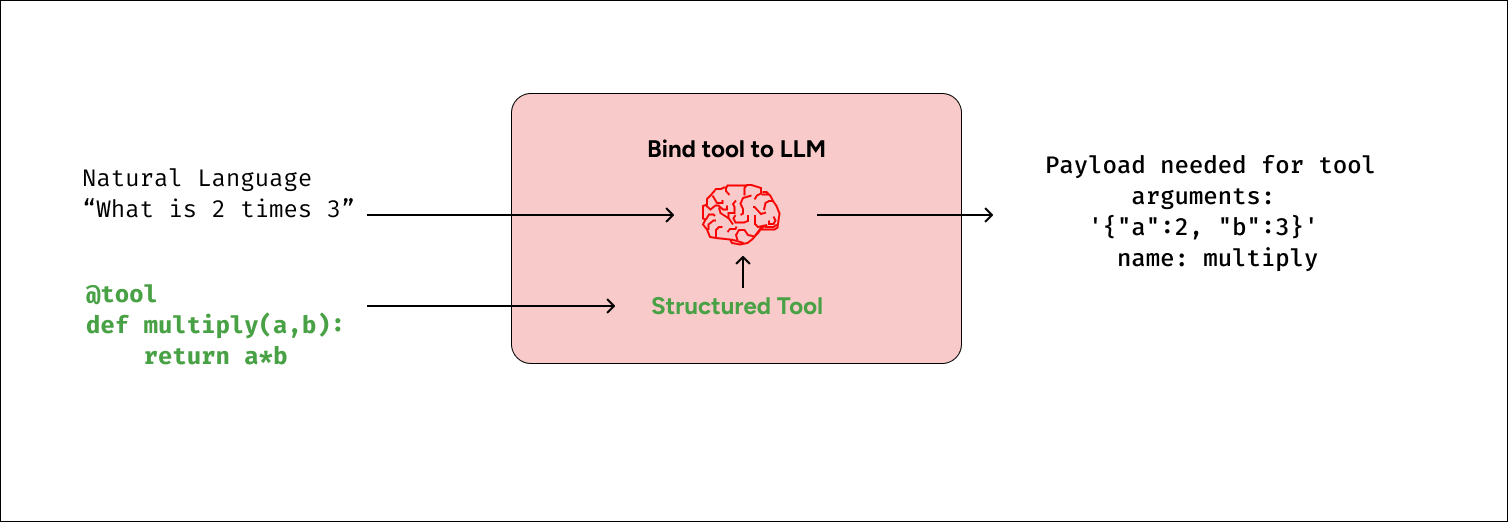
Let’s showcase a simple example of tool calling!
The multiply function is our tool.
The central concept to understand is that LangChain provides a standardized interface for connecting tools to models. The .bind_tools() method can be used to specify which tools are available for a model to call.
def multiply(a: int, b: int) -> int:
    """Multiply a and b.

    Args:
        a: first int
        b: second int
    """
    return a * b

llm_with_tools = llm.bind_tools([multiply])
If we pass an input - e.g., "What is 2 multiplied by 3" - we see a tool call returned.
The tool call has specific arguments that match the input schema of our function along with the name of the function to call.
{'arguments': '{"a":2,"b":3}', 'name': 'multiply'}
tool_call = llm_with_tools.invoke([HumanMessage(content=f"What is 2 multiplied by 3", name="Lance")])
tool_call.tool_calls
[{'name': 'multiply',
  'args': {'a': 2, 'b': 3},
  'id': 'call_8JXFNNwkeH4R0ZpUk8MG4OtK',
  'type': 'tool_call'}]
By default, the model has the freedom to choose which tool to use based on the user’s input. However, in certain scenarios, you might want to influence the model’s decision-making process. LangChain allows developers to enforce tool choice (using tool_choice), ensuring the model uses either a particular tool or any tool from a given list. This is useful for structuring the model’s behavior and guiding it towards a desired outcome.
For example, we can force our tool to call the multiply tool by using the following code:
llm_forced_to_multiply = llm.bind_tools(tools, tool_choice="multiply")
llm_forced_to_multiply.invoke("what is 2 + 4")
Output producted will be
AIMessage(content='', additional_kwargs={'tool_calls': [{'id': 'call_9cViskmLvPnHjXk9tbVla5HA', 'function': {'arguments': '{"a":2,"b":4}', 'name': 'Multiply'}, 'type': 'function'}]}, ...)
Even if we pass it something that doesn’t require multiplcation - it will still call the tool!
Using messages as state
With these foundations in place, we can now use messages in our graph state.
Let’s define our state, MessagesState, as a TypedDict with a single key: messages.
messages is simply a list of messages, as we defined above (e.g., HumanMessage, etc).
from typing_extensions import TypedDict
from langchain_core.messages import AnyMessage

class MessagesState(TypedDict):
    messages: list[AnyMessage]
Reducers
As we discussed, each node will return a new value for our state key messages.
But, this new value will override the prior messages value. As our graph runs, we want to append messages to our messages state key.
We can use reducer functions to address this.
Reducers allow us to specify how state updates are performed. If no reducer function is specified, then it is assumed that updates to the key should override it as we saw before.
But, to append messages, we can use the pre-built add_messages reducer. This ensures that any messages are appended to the existing list of messages. We simply need to annotate our messages key with the add_messages reducer function as metadata.
from typing import Annotated
from langgraph.graph.message import add_messages

class MessagesState(TypedDict):
    messages: Annotated[list[AnyMessage], add_messages]
Since having a list of messages in graph state is so common, LangGraph has a pre-built MessagesState!
MessagesState is defined:
- With a pre-build single
messageskey - This is a list of
AnyMessageobjects - It uses the
add_messagesreducer
We’ll usually use MessagesState because it is less verbose than defining a custom TypedDict, as shown above.
from langgraph.graph import MessagesState

class MessagesState(MessagesState):
    # Add any keys needed beyond messages, which is pre-built
    pass
To go a bit deeper, we can see how the add_messages reducer works in isolation.
# Initial state
initial_messages = [AIMessage(content="Hello! How can I assist you?", name="Model"),
                    HumanMessage(content="I'm looking for information on marine biology.", name="Lance")
                   ]
# New message to add
new_message = AIMessage(content="Sure, I can help with that. What specifically are you interested in?", name="Model")
# Test
add_messages(initial_messages , new_message)
[AIMessage(content='Hello! How can I assist you?', additional_kwargs={}, response_metadata={}, name='Model', id='c6075c89-557b-4e91-a1c0-a076805040cf'),
 HumanMessage(content="I'm looking for information on marine biology.", additional_kwargs={}, response_metadata={}, name='Lance', id='0bfb9739-9b35-4805-baab-6841c82c70c2'),
 AIMessage(content='Sure, I can help with that. What specifically are you interested in?', additional_kwargs={}, response_metadata={}, name='Model', id='9575cc28-ad2e-4a9f-8fa0-48d3249b2443')]
Our graph
Now, lets use MessagesState with a graph.
from IPython.display import Image, display
from langgraph.graph import StateGraph, START, END

# Node
def tool_calling_llm(state: MessagesState):
    return {"messages": [llm_with_tools.invoke(state["messages"])]}

# Build graph
builder = StateGraph(MessagesState)
builder.add_node("tool_calling_llm", tool_calling_llm)
builder.add_edge(START, "tool_calling_llm")
builder.add_edge("tool_calling_llm", END)
graph = builder.compile()

# View
display(Image(graph.get_graph().draw_mermaid_png()))
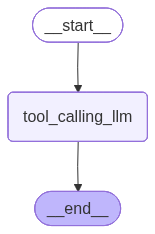
If we pass in Hello!, the LLM responds without any tool calls.
messages = graph.invoke({"messages": HumanMessage(content="Hello!")})
for m in messages['messages']:
    m.pretty_print()
===[1m Human Message [0m======
Hello!
===[1m Ai Message [0m=========
Hello! How can I assist you today?
The LLM chooses to use a tool when it determines that the input or task requires the functionality provided by that tool.
messages = graph.invoke({"messages": HumanMessage(content="Multiply 2 and 3")})
for m in messages['messages']:
    m.pretty_print()
===[1m Human Message [0m=======
Multiply 2 and 3
===[1m Ai Message [0m==========
Tool Calls:
multiply (call_tcaBei7gWiotyXYa1wsiBMaB)
Call ID: call_tcaBei7gWiotyXYa1wsiBMaB
Args:
a: 2
b: 3
Summary
In this blog we learnt how to use chat messages and chat models. We also learnt how to use tools to a chat model. We also learnt how to append state to existing messages.